Wholesale distribution ERP: The top ERP systems for 2026




A contractor needs 400 copper fittings by Friday. Your system says you have 380. Your supplier needs nine days. Meanwhile, a pallet of slow-moving fittings in a different size has been sitting in aisle six since spring.
Every purchasing team has lived some version of this morning, and nearly all of it comes down to one gap: buying decisions made without a clear, connected view of demand, stock, and supplier timing.
Material requirements planning, better known as MRP, was invented to close that gap. It started on factory floors in the 1960s and still drives how manufacturers schedule production today. Distributors face a related puzzle with one big difference: they buy finished goods to resell, not components to assemble.
So the useful question for a wholesale distributor is not whether MRP is good or bad. It is which parts of MRP thinking belong on your shelves, and which belong in a factory.
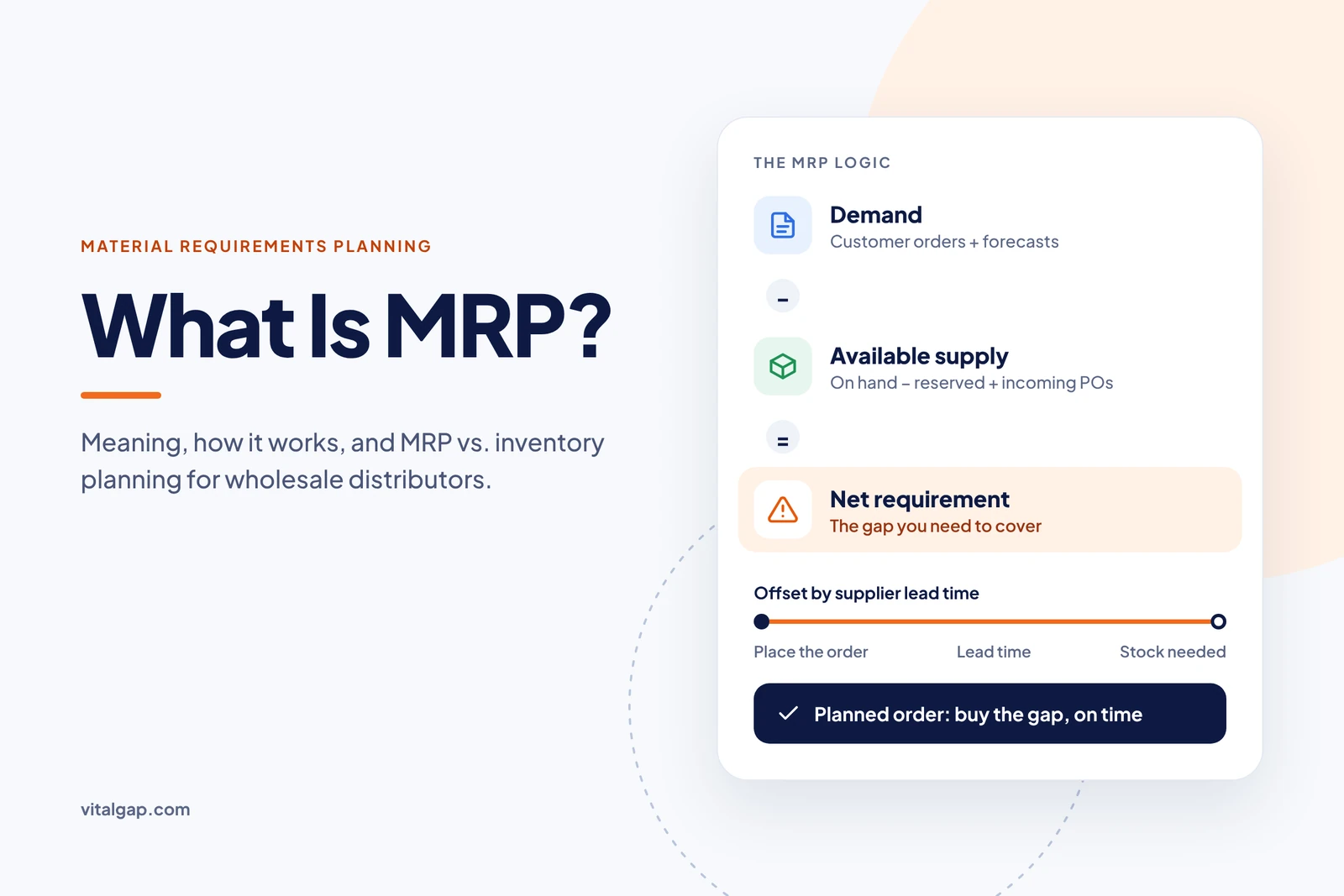
MRP stands for material requirements planning. It is a method for working out which materials a business needs, in what quantity, and by what date, so supply arrives in time to meet demand without piling up excess stock.
The concept has deep roots. IBM engineer Joseph Orlicky formalized MRP in 1964, and Black & Decker became the first company to put it into practice that same year (Wikipedia). Orlicky's book on the method went on to sell more than 140,000 copies and became the blueprint for standardized MRP systems (QAD).
An MRP system is software that runs the MRP calculation for you. It pulls demand, product structures, inventory management records, open orders, and lead times into one place, then produces a time-phased list of what to buy or make and when. Before computers, planners did this math on paper. Software made it possible to recalculate requirements weekly or daily instead of once a quarter.
Businesses use MRP to avoid two expensive mistakes at the same time: running out of what they need and overbuying what they don't. A good plan keeps materials flowing to production or customers while holding inventory investment down. The category is large and still growing. 360iResearch values the global MRP software market at $19.84 billion in 2025 and projects it will reach $33.45 billion by 2032 (360iResearch via GII).
It is both. MRP is first a planning logic: take demand, subtract what you already have or have coming, and schedule the difference around lead times. MRP software is the tool that applies that logic at scale. The distinction matters because you can follow MRP principles in a modest system, and you can own expensive MRP software that produces poor plans if the underlying data and rules are wrong.
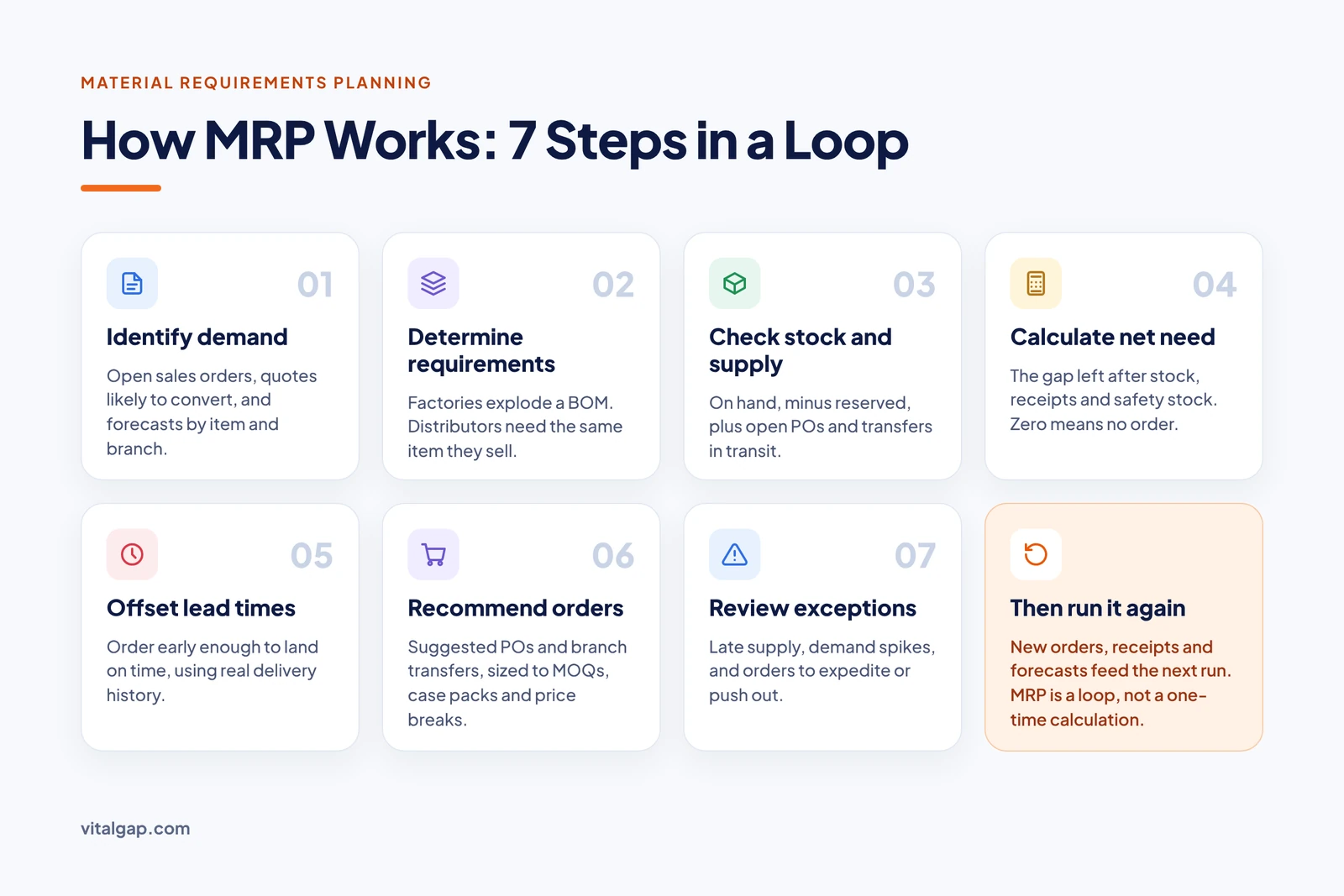
MRP works by turning expected demand into a dated list of purchase and production actions. It starts with what customers or production need, subtracts what is already on hand or on the way, and schedules the remaining shortfall far enough ahead to cover supplier or production lead times. The cycle then repeats as orders, receipts, and forecasts change.
One caveat before the steps. Manufacturing MRP explodes a bill of materials and follows a production schedule. Distribution replenishment usually skips both, because a distributor sells the same item it buys. Instead, it leans on sales demand, stock availability, supplier lead times, order quantities, and service-level targets. The seven steps below describe the classic manufacturing flow, with notes on how distributors adapt each one.
Every plan begins with demand: confirmed customer orders, forecasted sales, and, in manufacturing, the master production schedule that says which finished products will be built and when. Distributors replace the production schedule with open sales orders, quotes likely to convert, and forecasts by item and branch.
Next, the system works out what that demand requires. A manufacturer "explodes" the bill of materials, so an order for 100 control panels becomes 100 enclosures, 400 breakers, and 1,200 terminal blocks. A distributor's version is simpler: an order for 100 breakers requires 100 breakers, though kits and assemblies can add a light BOM step.
Gross requirements are compared against usable stock. That means on-hand quantity minus anything already reserved or committed, plus scheduled receipts such as open purchase orders and transfers already in transit.
Net requirements are the gap that remains: gross requirements, minus available inventory, minus scheduled receipts, plus any safety stock the business wants to protect. If the result is zero or negative, nothing needs to be ordered for that period.

MRP then offsets each requirement backward by its lead time, so an order is placed early enough to arrive when it is needed. Lead time is not a fixed number to set and forget. According to the Institute for Supply Management, supplier deliveries to U.S. manufacturers slowed in October 2026 for the 11th consecutive month, with the Supplier Deliveries Index at 59.1 percent (ISM via PR Newswire). When suppliers slow down, plans built on last year's lead times arrive late. Distributors in categories like heating and cooling feel this sharply during peak season, a pattern covered in VitalGap's guide to HVAC procurement pitfalls.
The system converts net, time-offset requirements into planned orders. Order-sizing rules shape the final quantities: minimum order quantities, case packs, price breaks, and freight thresholds. A manufacturer gets planned production orders and planned purchase orders. A distributor typically gets suggested purchase orders and branch transfers.
Finally, a planner reviews what the system flagged: late supply, orders that should be expedited or pushed out, and items whose demand suddenly spiked. Adjusted plans feed back into the next run, which is why MRP is a loop rather than a one-time calculation.
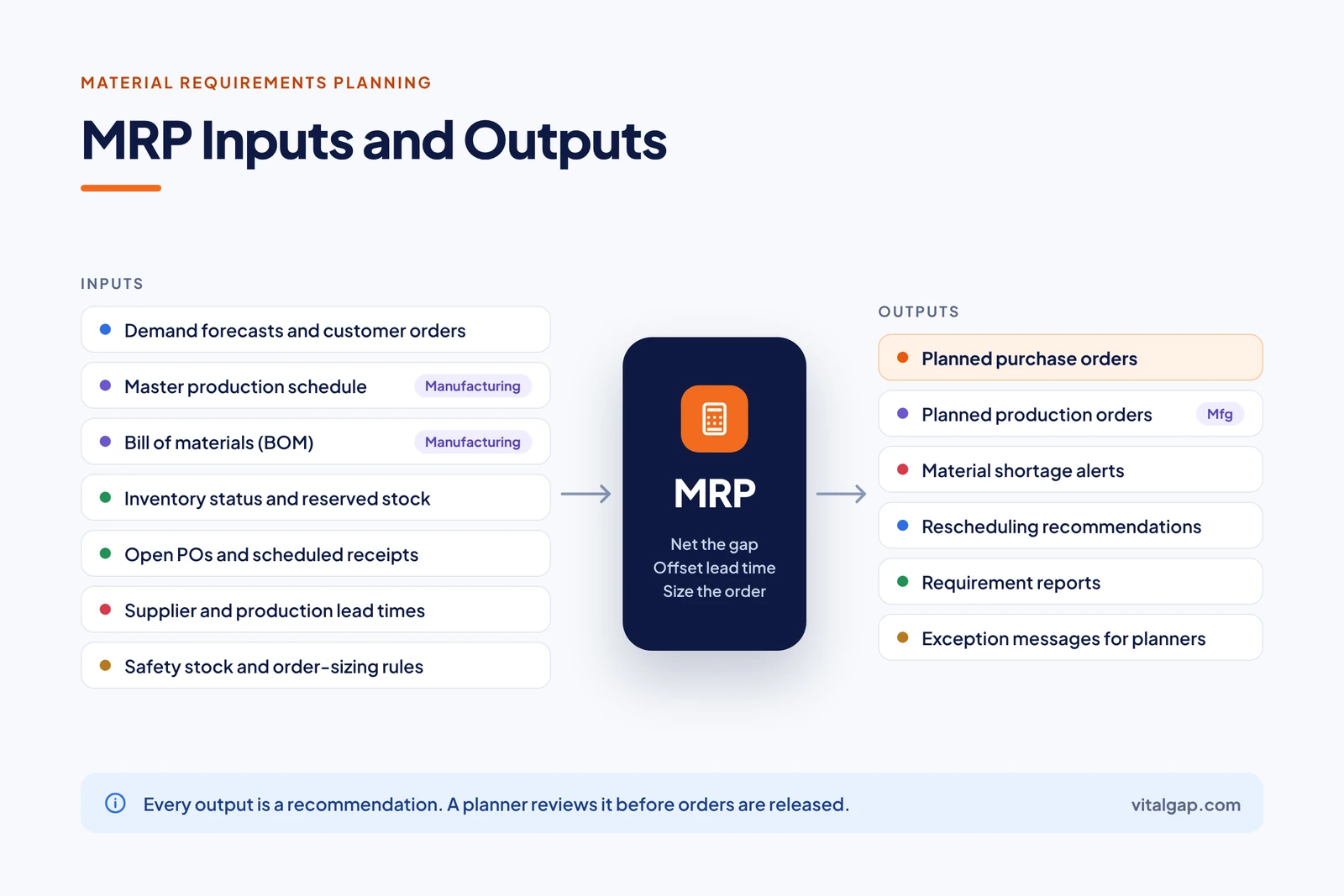
The main inputs of an MRP system are demand (forecasts and customer orders), the master production schedule, the bill of materials, inventory status, scheduled receipts, lead times, and the safety stock and order-sizing rules that shape each order. The plan can only be as good as these inputs, and bad data costs real money: Gartner estimates poor data quality costs organizations an average of $12.9 million a year (Gartner).
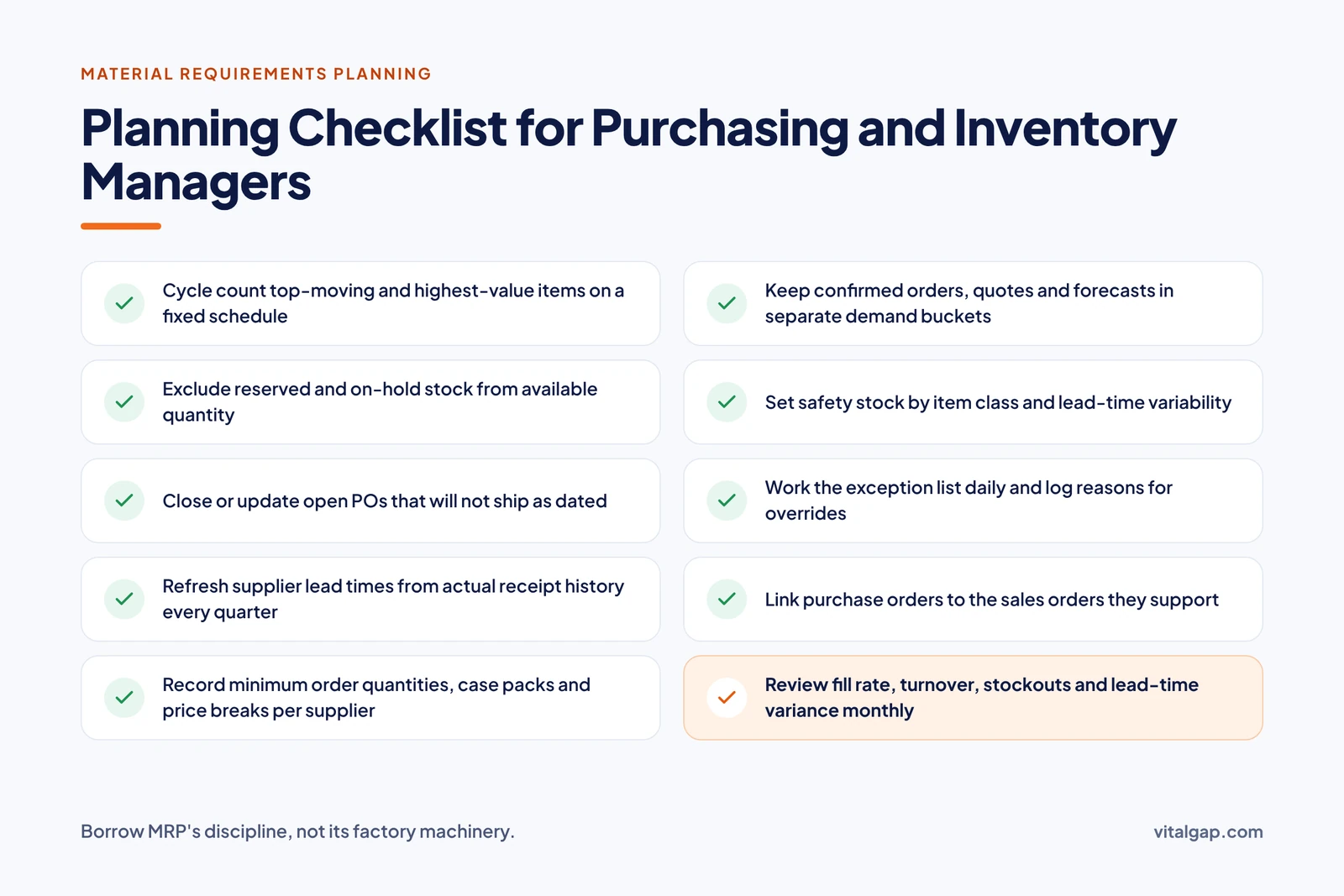
Confirmed orders are facts; forecasts are estimates. Good planning keeps them visibly separate so a planner knows how much of a recommendation rests on firm demand.
The MPS is the manufacturer's statement of what it will build and when. It is central to manufacturing MRP, but most distributors do not need one because they do not produce goods.
A BOM lists every component, subassembly, and quantity in a finished product. Like the MPS, it drives traditional manufacturing MRP. Distributors may use a simple BOM for kits or assemblies, but core replenishment usually runs without one.
The system needs to know more than a total count. It needs on-hand quantity by location, what is reserved for open orders, and what is damaged or on hold.
Open POs and in-transit transfers count as future supply. Closing or updating POs that will never be filled is one of the simplest ways to improve plan accuracy.
Lead times should reflect what suppliers actually deliver, not what their catalog promises. Many teams still track these in spreadsheets, which is the kind of hidden cost explored in The $50,000 Spreadsheet Problem.
Safety stock protects against demand and supply variability. Order-sizing rules translate a raw requirement into a quantity a supplier will actually ship.
MRP produces planned purchase orders, planned production orders, shortage alerts, rescheduling suggestions, requirement reports, and exception messages. Every one of these is a recommendation, not a command. The system knows only what its data and rules tell it, so a planner should review the output before releasing orders, especially when supplier constraints, shifting demand, or questionable inventory records are in play.
These are suggested buys: item, quantity, supplier, and the date the order should be placed to arrive on time. Once approved, they become real purchase orders.
For manufacturers, these suggest what to make, how much, and when to start so finished goods are ready by the due date. Distributors rarely see these unless they assemble kits.
Shortage alerts flag items where projected supply will not cover demand in time. They give the team a chance to expedite, substitute, or tell the customer early.
When demand moves, MRP suggests pulling existing orders in or pushing them out. Acting on these keeps inventory aligned with real need instead of the original plan.
Time-phased reports show projected on-hand balances, gross and net requirements, and planned receipts by period. They help buyers see trouble weeks before it reaches the warehouse.
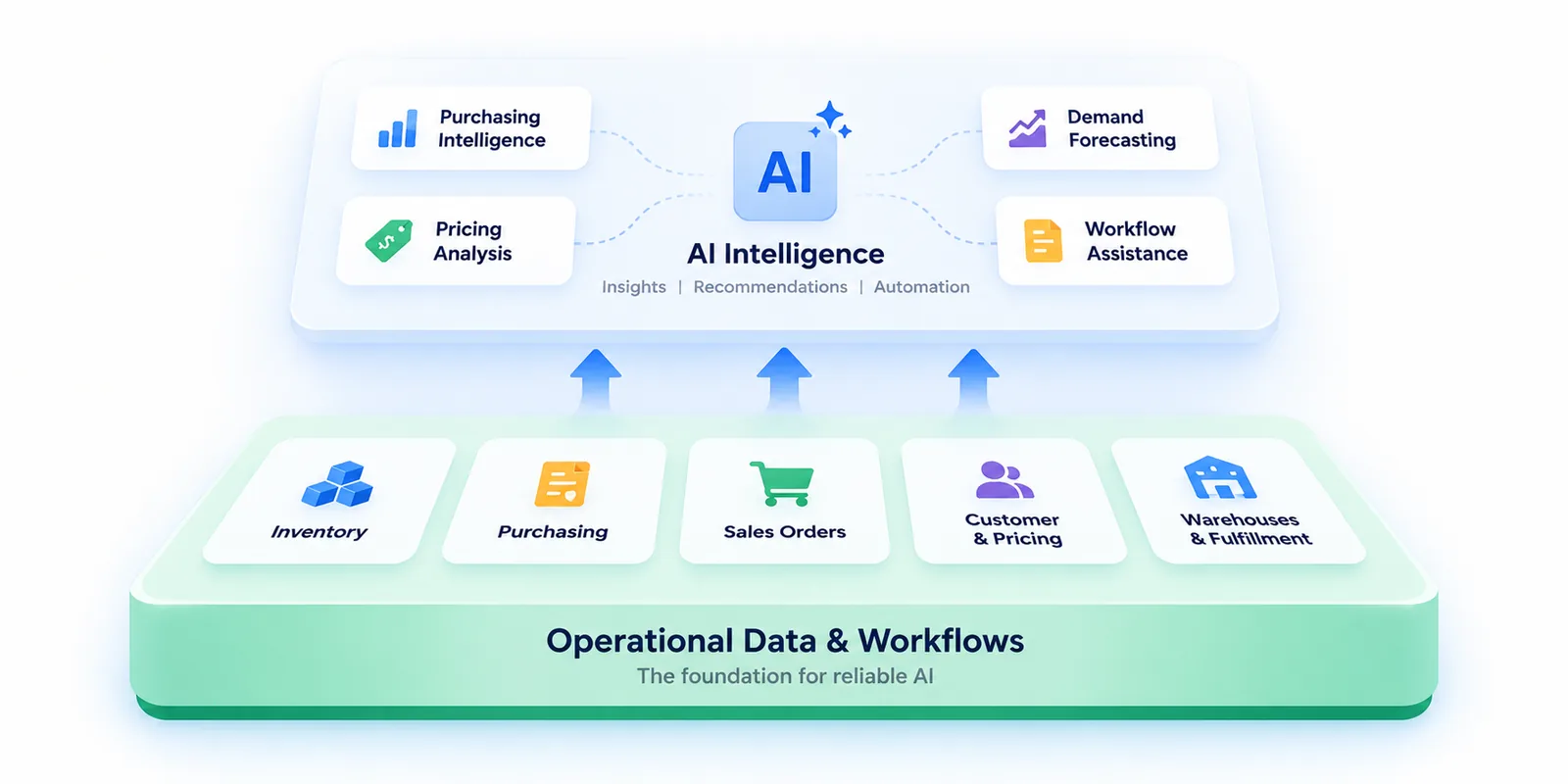
Exceptions are the short list of items that need human judgment, such as past-due receipts, orders below minimum, or demand spikes. Working the exceptions, rather than every line, is how planners stay efficient. AI can help rank and explain these exceptions, but it works best on a clean operational foundation, as VitalGap argues in The Right Way to Bring AI Into Wholesale Distribution.
The main benefits of MRP are better material availability, less excess inventory, fewer shortages, purchasing that follows real demand, tighter production schedules, and earlier visibility into constraints. Each benefit comes from a specific mechanism, and none is automatic. Results depend on data quality, planning discipline, and how well the rules fit the business.
The stakes are large. IHL Group puts the global cost of inventory distortion, meaning out-of-stocks plus overstocks, at $1.73 trillion in 2025, or 6.5% of worldwide retail sales (Chain Store Age). That figure covers retail, but the same two failure modes hit distributors and manufacturers.
MRP schedules supply against dated requirements, so materials are ordered before the shortage happens rather than after. Track this with fill rate or material availability percentage.
By netting requirements against stock and open orders, MRP buys only the gap. That matters because holding stock is expensive: APQC and ISM benchmarks put annual carrying costs at roughly 20% to 30% of average inventory value (Six Sigma DSI). Track inventory turnover and stockout frequency.
Buyers see what is needed and when, instead of reacting to empty bins. Purchasing becomes a scheduled activity rather than a series of rush orders.
For manufacturers, materials arrive in sequence with the build plan, which reduces line stoppages. Track schedule adherence.
Time-phased projections expose shortages weeks ahead, giving teams time to expedite, substitute, or reset customer expectations. Track supplier lead-time variance to see where risk is building.
Shared rules replace individual habits. Two buyers looking at the same item reach the same answer, and changes to the rules can be measured.
MRP plans the components a manufacturer needs to build finished products, while inventory replenishment plans how much finished stock a distributor should buy to keep items available for resale. Both match supply to demand, but they start from different questions and use different inputs. They are not interchangeable, and a simple reorder point is not a full substitute for manufacturing MRP.
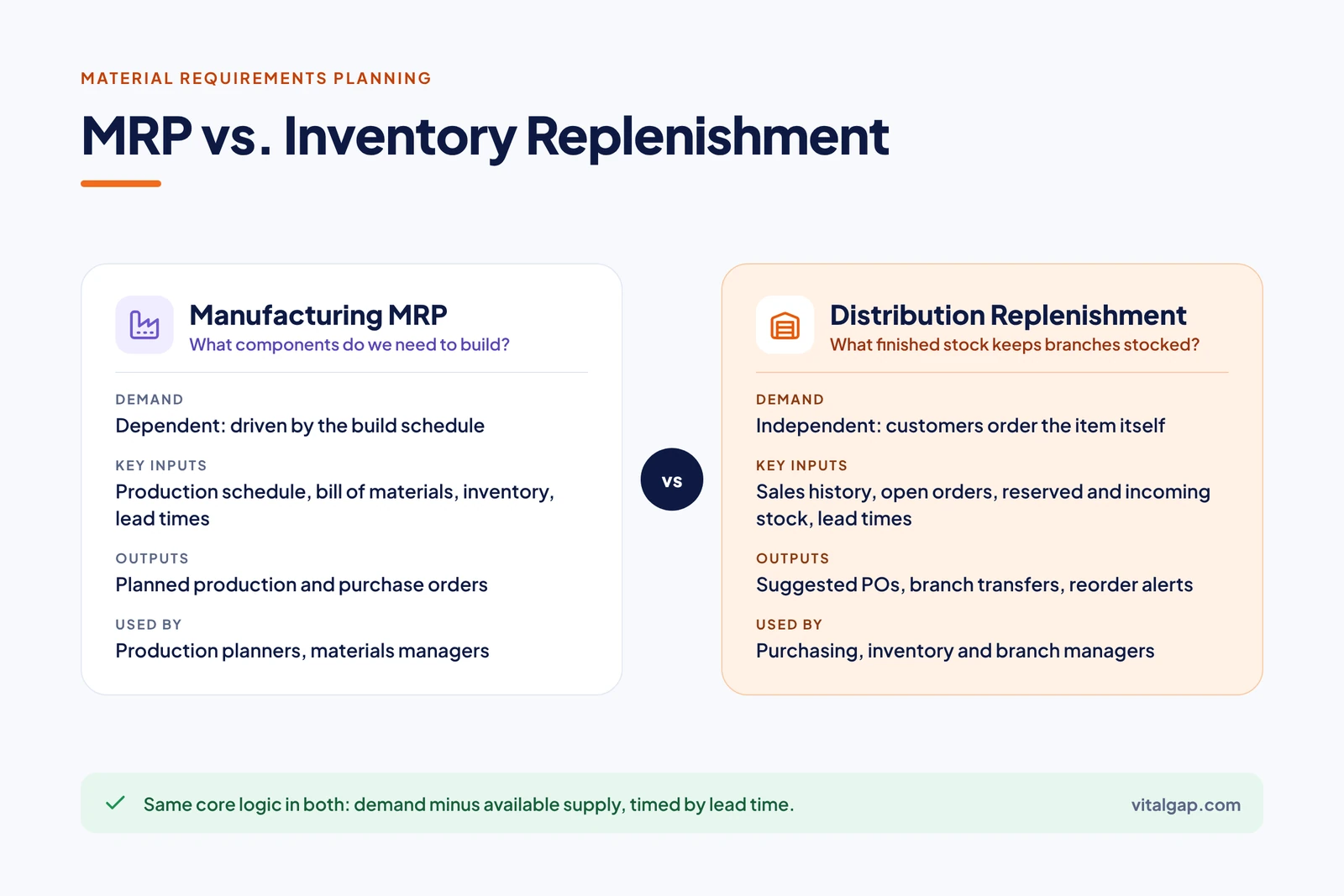
Manufacturing MRP deals with dependent demand. The need for a component depends entirely on how many finished products are scheduled. That is why the BOM and MPS sit at the center of the calculation.
Distributors deal mostly with independent demand. Customers order the item itself, so there is no BOM to explode. Replenishment uses methods like reorder points, min/max levels, and forecast-driven suggested orders, adjusted for each branch and supplier.
In MRP, demand is calculated from the schedule and timing is driven by production dates. In replenishment, demand is forecast from sales patterns, and timing is driven by how long stock will last versus how long the supplier takes. Both rely on accurate stock levels, but distributors usually carry more SKUs across more locations, so a small error rate affects more buying decisions.
Basic reorder points work well for steady, high-volume items. They start to break down when a business has seasonal swings, many branches, large project orders, long or erratic lead times, or volume pricing that rewards consolidated buys. If your team is patching these gaps in spreadsheets, it is often a sign of having outgrown accounting software.
Available stock is not the same as on-hand stock. Quantities reserved for open orders should be excluded, backorders should count as demand already owed, and incoming POs should count as supply only when their dates are reliable. Systems built for distribution reality treat these as standard inputs to every purchasing suggestion, not as manual adjustments.
MRP focuses on one job, planning materials, while ERP (enterprise resource planning) is a broader system that runs many parts of the business on shared data, including sales, purchasing, inventory, warehousing, and finance. In most modern software, MRP is a module or function inside an ERP rather than a separate product. Exact capabilities vary by vendor and configuration.
A business needs more than MRP when its planning problems are really connection problems. Common signs include sales quoting from stale stock numbers, purchasing that cannot see open orders, and accounting that reconciles inventory by hand at month end. Moving to ERP is a real project; Panorama Consulting's 2026 ERP Report found a median implementation timeline of nine months (ERP-Software.org summary of Panorama). For distributors comparing options, VitalGap's roundup of the top wholesale distribution ERP systems is a useful starting point.
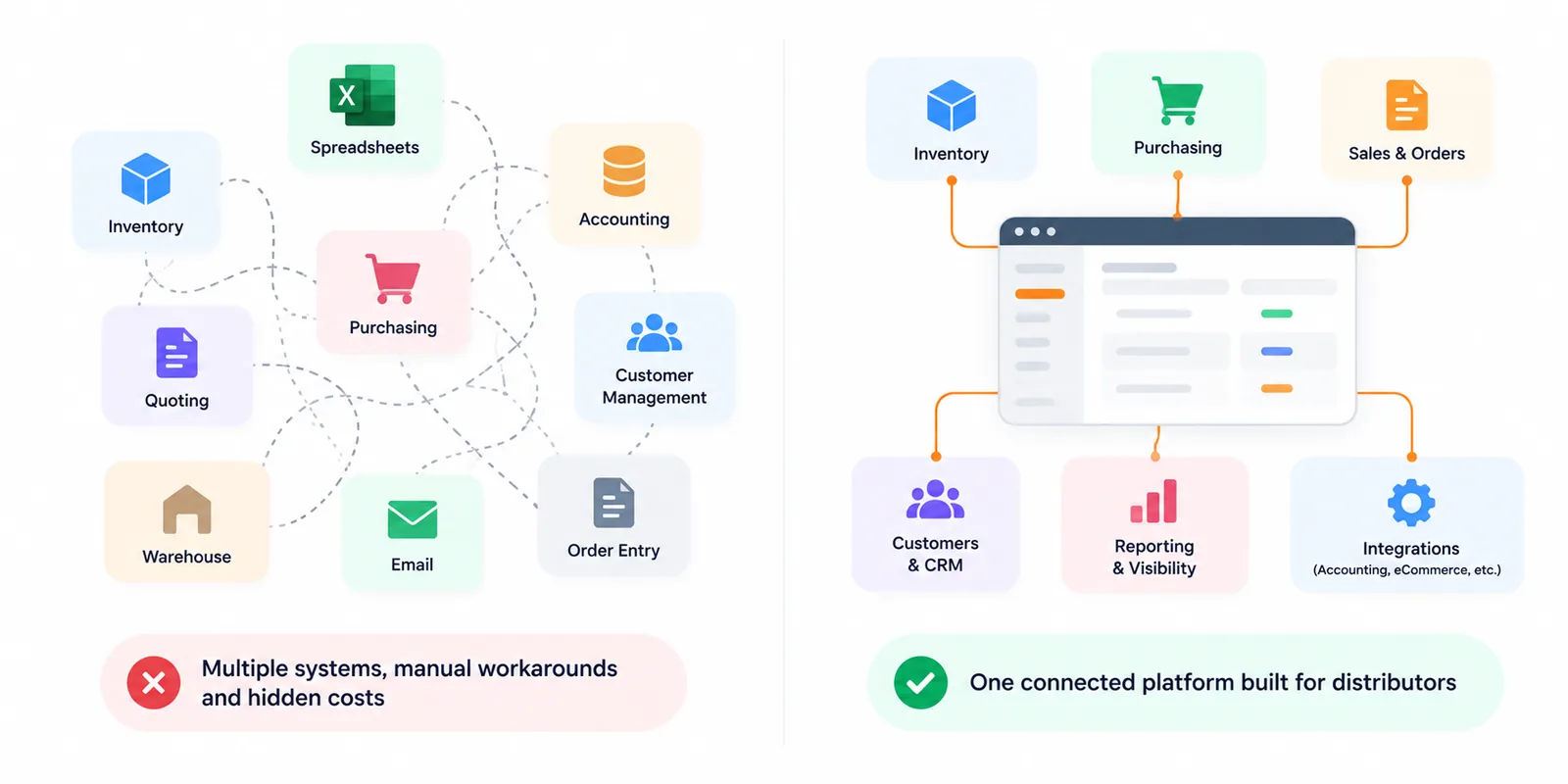
When these functions share one record, a sales order instantly reserves stock, a purchase suggestion already accounts for that reservation, a receipt updates availability for every branch, and the financial impact posts without re-entry. A unified operating system removes the delays and copy errors that make planning data unreliable in the first place.
MRP plans materials, MRP II (manufacturing resource planning) extends that plan to the wider resources of a factory, and ERP extends it again to the whole enterprise. Each generation kept the core netting logic of the one before and added more of the business around it. Oliver Wight introduced MRP II in 1983, building master scheduling and capacity planning on top of Orlicky's MRP (Wikipedia).
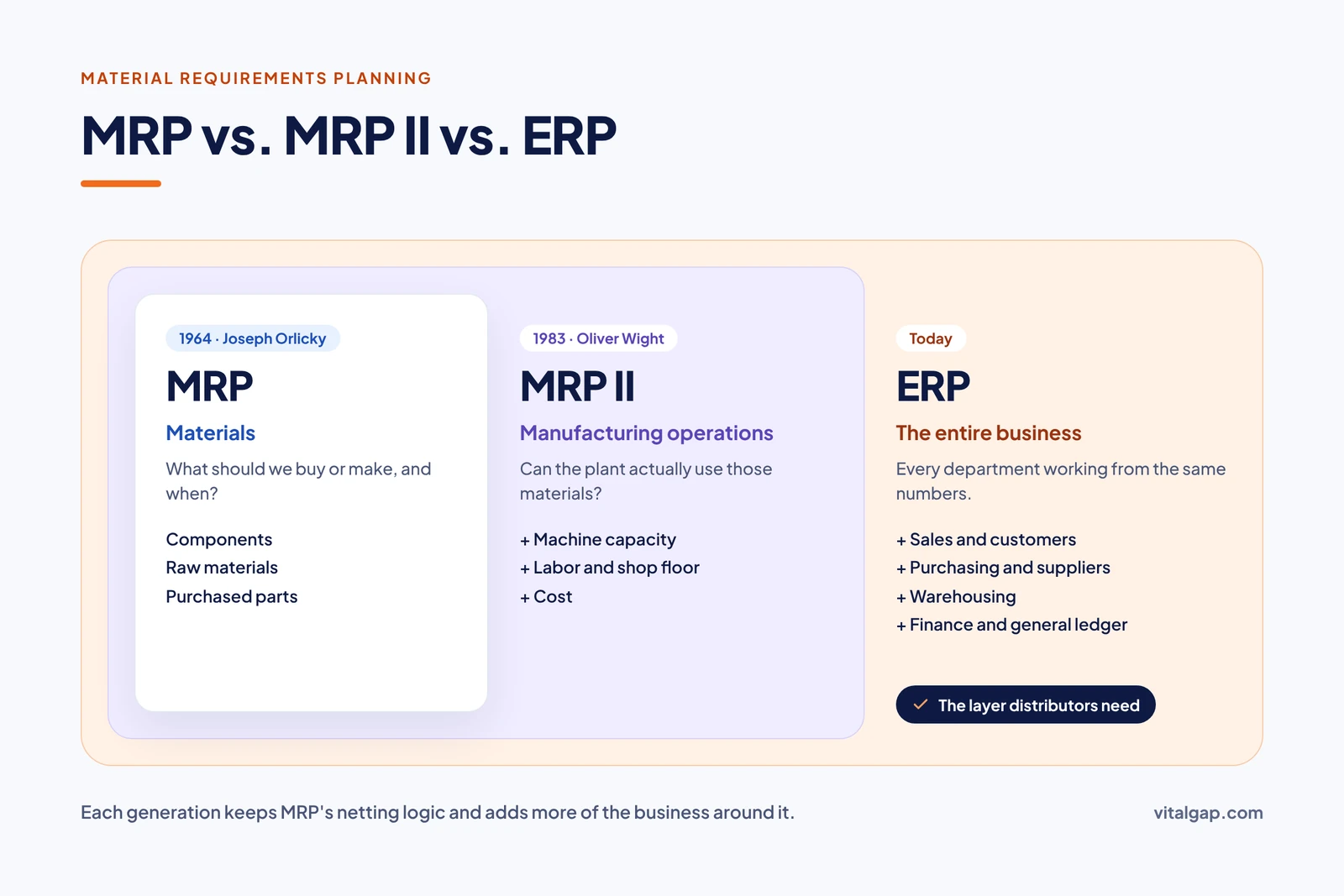
MRP answers whether the materials will be there. MRP II adds whether the plant has the capacity, labor, and machine time to use them, and ties the plan to cost. ERP then connects that operational picture to customers, suppliers, and the general ledger, so every department works from the same numbers. For distributors, the most relevant layer is usually ERP with strong purchasing and inventory planning, not MRP II, since there is no shop floor to schedule. VitalGap breaks down which capabilities matter most in 7 ERP features that actually matter for distribution.
In wholesale distribution, MRP's role is mostly conceptual: its net-requirements logic shapes how good purchasing systems think, but most distributors do not need a full manufacturing MRP system. What they need is replenishment planning that applies the same discipline (demand minus available supply, offset by lead time) to finished goods across branches, customers, and suppliers.
The margin for error is thin. U.S. merchant wholesalers held about 1.19 months of inventory relative to monthly sales in April 2026, according to Census Bureau data (FRED, U.S. Census Bureau). For electrical and electronic goods wholesalers, the ratio was just 0.87 in May 2026. With less than a month of stock on the shelf, a late PO or a miscounted bin shows up quickly as a missed delivery.
A distributor's demand comes from counter sales, stock orders, quotes, and project bids. Turning that into purchasing requirements means weighting confirmed orders differently from forecasts and quotes, then rolling them up by item, branch, and supplier.
The distribution version of MRP netting is available-to-promise: on-hand stock, minus quantities reserved for open orders, plus incoming POs and transfers with reliable dates. Buying off on-hand totals alone is the most common cause of surprise shortages.
Each supplier, and sometimes each product line, has its own lead time and reliability. Planning replenishment around actual delivery history, not quoted lead times, keeps reorder points honest. Distributors in HVAC, where demand peaks with the weather, and steel and metals, where mill lead times can stretch for weeks, feel this most.
Special orders and job-based demand behave more like manufacturing MRP than routine replenishment. The material is tied to a specific customer and date, so it should be planned against that job, reserved on arrival, and kept out of general stock calculations.

When a purchase order is linked to the sales order it supports, buyers can see which customer is waiting, and sales can see when material will land. That link turns "when will it be here?" from a phone call into a lookup.
Partial receipts should update availability immediately and allocate the arrived quantity by priority. Backordered lines remain open demand until they ship, so they should keep driving purchasing until filled.
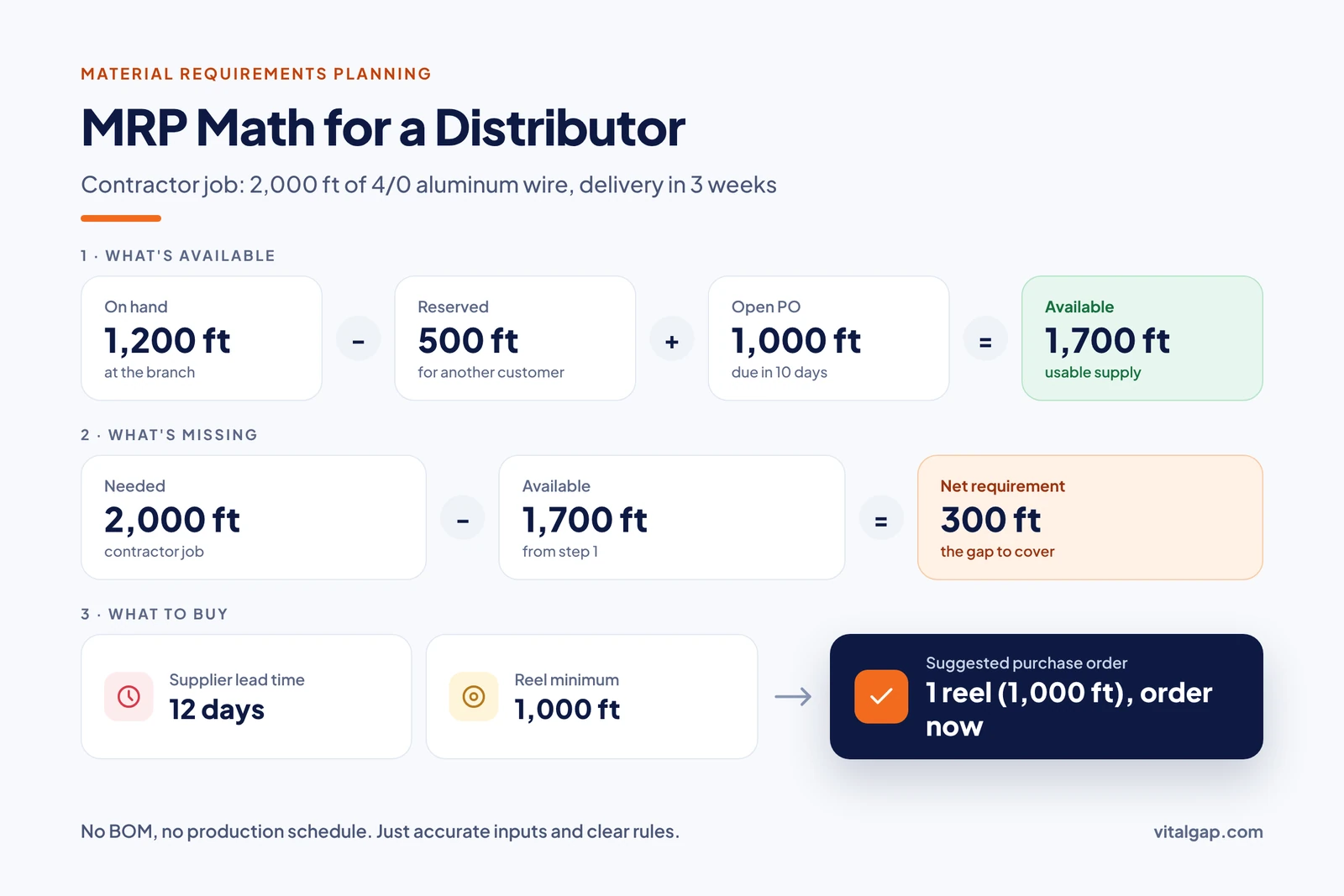
Consider an electrical distributor that wins a contractor job requiring 2,000 feet of 4/0 aluminum wire for delivery in three weeks. The branch shows 1,200 feet on hand, but 500 feet are already reserved for another customer. A PO for 1,000 feet is open, due in ten days. Available supply is 1,200 minus 500 plus 1,000, or 1,700 feet, leaving a 300-foot net requirement. With a supplier lead time of 12 days and a 1,000-foot reel minimum, the system should suggest one reel, ordered now. This is MRP thinking with no BOM and no production schedule, just accurate inputs and clear rules. Hardware and building materials distributors run the same math on jobsite deliveries every day.
You improve material and inventory planning by cleaning up the inputs, setting rules that match how your suppliers and customers actually behave, and reviewing results on a regular cycle. Software amplifies whatever discipline is already in place, good or bad.
Every planning error downstream starts with a wrong count upstream. The problem is more common than most teams think: research from Auburn University's RFID Lab found an average inventory accuracy of 63% across the retailers and brands it studied (Just Style). Use cycle counts, scan-based receiving, and immediate posting of transfers and adjustments.

Compare quoted lead times against actual receipt dates each quarter, and update the planning parameters to match. Record minimums, case packs, and freight thresholds so suggested orders are ones a supplier will accept.
Keep firm orders, quotes, and forecasts in distinct buckets. Planners should be able to see how much of any recommendation depends on demand that has not been confirmed.
Set buffers by item class rather than one blanket rule. Fast, critical items deserve more protection than slow, easily sourced ones, and safety stock should rise when lead-time variance rises.
Treat system suggestions as a starting point. Work the exception list daily, and document why overrides happen so the rules can improve.
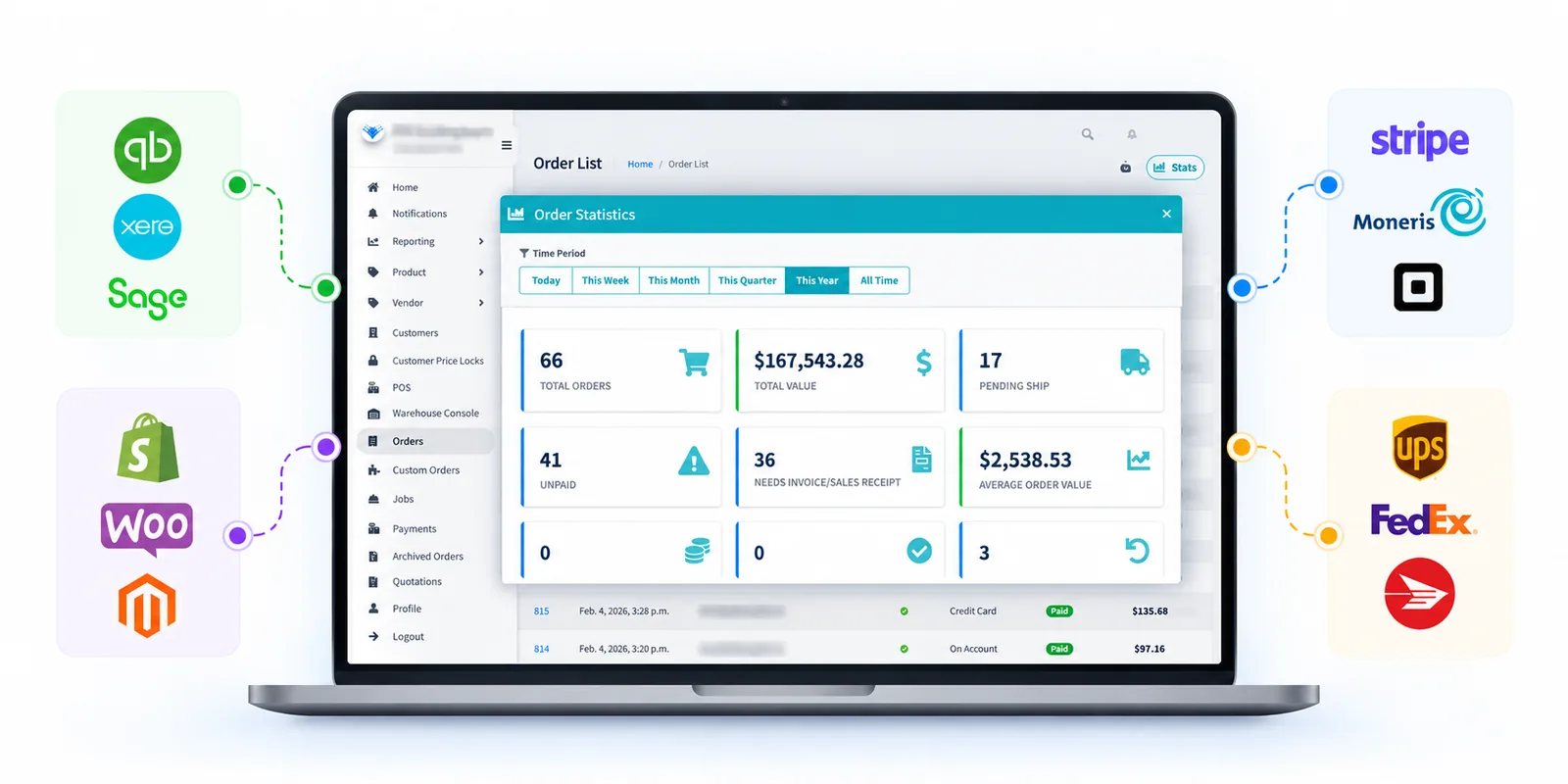
When these live in separate tools, planners spend their time reconciling instead of planning. VitalGap explains how that disconnect drains returns in why your distribution software stack is killing your ROI. If you are consolidating systems, bring clean history with you; the steps are covered in how to migrate historical data to a distribution ERP.
Measure forecast error, fill rate, and stockouts monthly, then tune the parameters that drive them. Better forecasting can move these numbers meaningfully: McKinsey reports that AI-driven forecasting can cut supply chain forecast errors by 20% to 50% and reduce lost sales from product unavailability by up to 65% (McKinsey). Those gains depend on the data foundation described above, a point explored further in how AI is transforming distribution and wholesale operations.
Sixty years after Orlicky sketched it out, the core of MRP still holds: know what you need, know what you have, know how long supply takes, and act on the gap before it becomes a problem. Manufacturers apply that logic through bills of materials and production schedules. Distributors apply it through replenishment that respects reserved stock, open POs, backorders, and real supplier lead times.
The practical takeaway for a wholesale distributor is to borrow MRP's discipline, not its factory machinery. Clean records, honest lead times, clear rules, and connected data will do more for your fill rate than any single planning algorithm. If you are weighing whether your current tools can get you there, VitalGap's guide on what to look for in a new-age ERP is a good next read, and you can always talk to the VitalGap team about how distribution-specific purchasing planning works in practice.


Whether you're looking to streamline operations, boost efficiency, or drive growth, VitalGap has the solutions you need.