November 17, 2026

What Is Cloud ERP? Benefits, Features, and How It Works

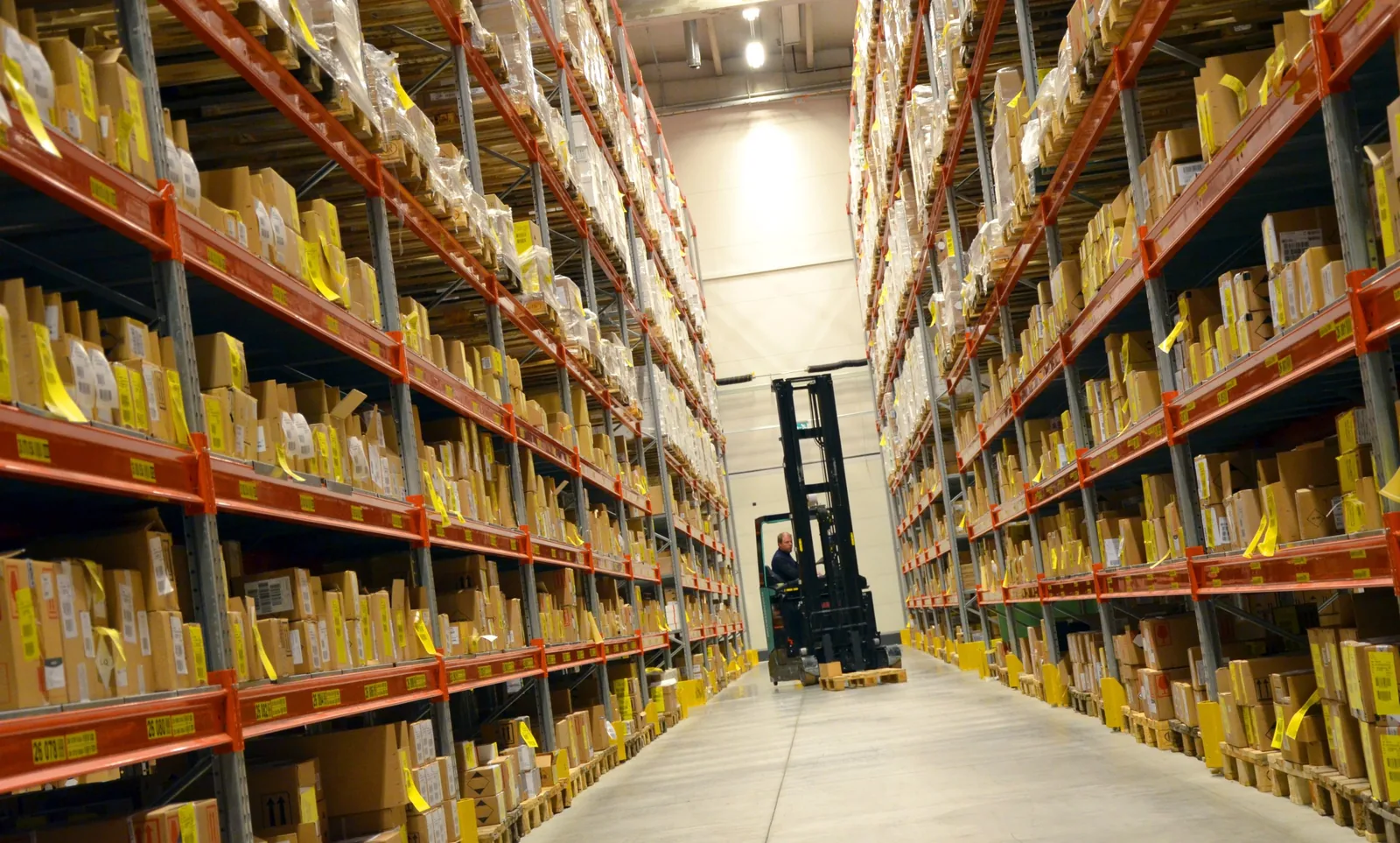
Warehouse aisle with stocked inventory shelves and a forklift, managed with cloud ERP

Maria runs a busy electrical supply company. Her Monday starts with a phone call. A contractor needs 40 breakers by noon.

Maria checks her stock screen. It says 52 on hand. She promises the order.

Ten minutes later, the warehouse calls back. Twelve breakers are already set aside for another job. Ten more came in damage. The real number is 30.

Purchasing never heard about the shortfall. Accounting won't see the sale until Friday. Nobody did anything wrong. The systems just never talked to each other.

This story plays out in distribution businesses every day. Data sits in spreadsheets, inboxes, and an old server in the back office. Every team sees a different version of the truth.

Cloud ERP was built to end that story. It puts inventory, purchasing, sales, warehouse, and finance on one live system. Everyone works from the same numbers, whether they're at the counter, in the warehouse, or on the road.

Let's start with a plain definition. Then we'll follow Maria's next order through a connected system, one step at a time. Along the way, you'll see which features matter, how security really works, and how to pick the right platform for your business.
What Is Cloud ERP?

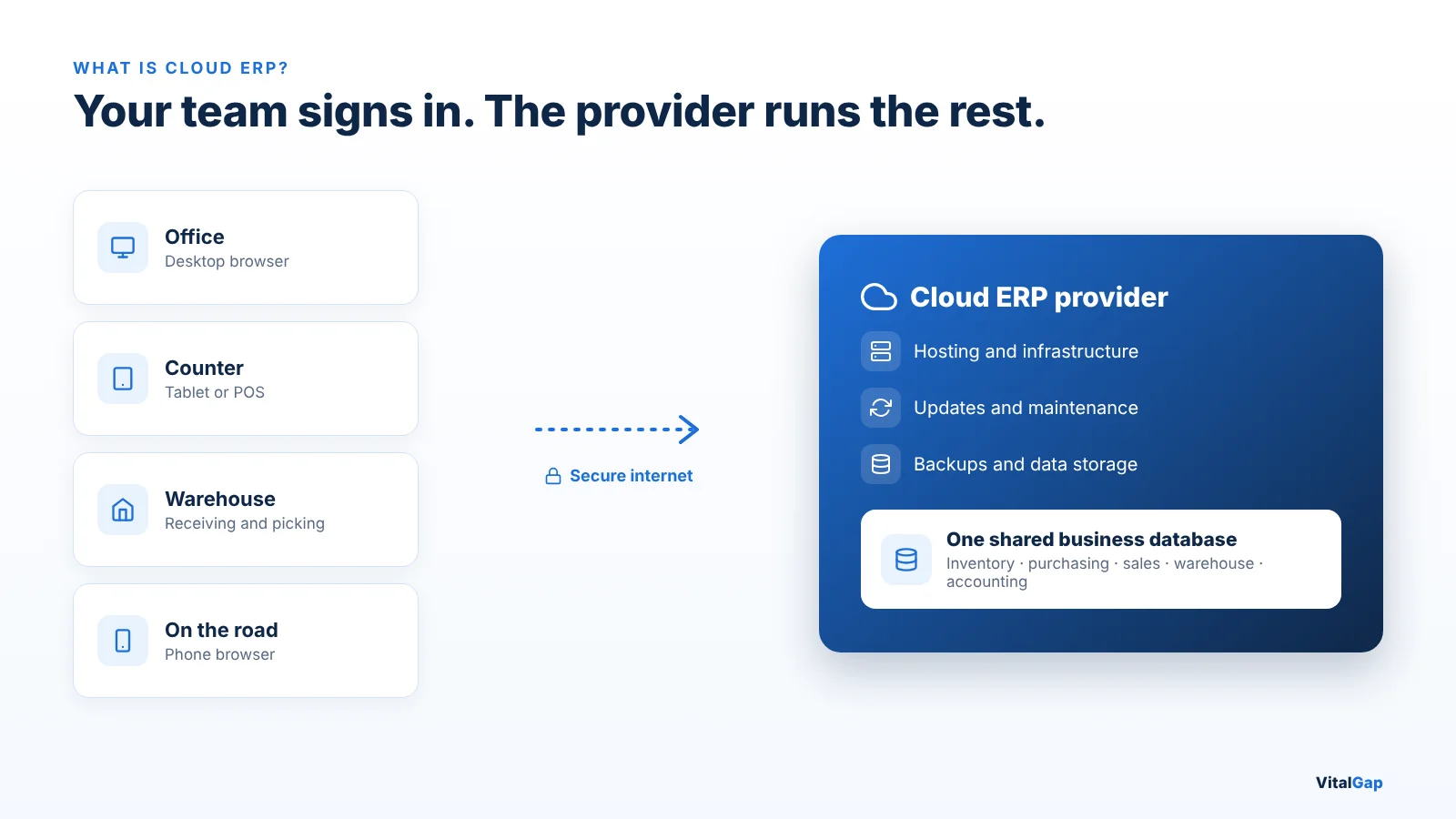
Cloud ERP is business management software that runs on a provider's internet-hosted servers instead of computers in your office. ERP stands for enterprise resource planning. A cloud ERP system connects inventory, purchasing, sales, warehouse, and accounting data in one shared database that your team opens through a web browser or app.

With cloud-based ERP, the provider usually handles hosting, updates, and much of the maintenance. You pay a subscription instead of buying servers and perpetual licenses. Your team signs in from any approved device with an internet connection.

The shift to ERP in the cloud is well underway. Fortune Business Insights values the global cloud ERP market at $65.89 billion in 2025. It projects the market will reach $207.59 billion by 2034, growing 13.4% a year.

If ERP itself is new to you, our explainer on ERP for wholesale distribution covers the basics before you compare deployment options.
How Does Cloud ERP Work?

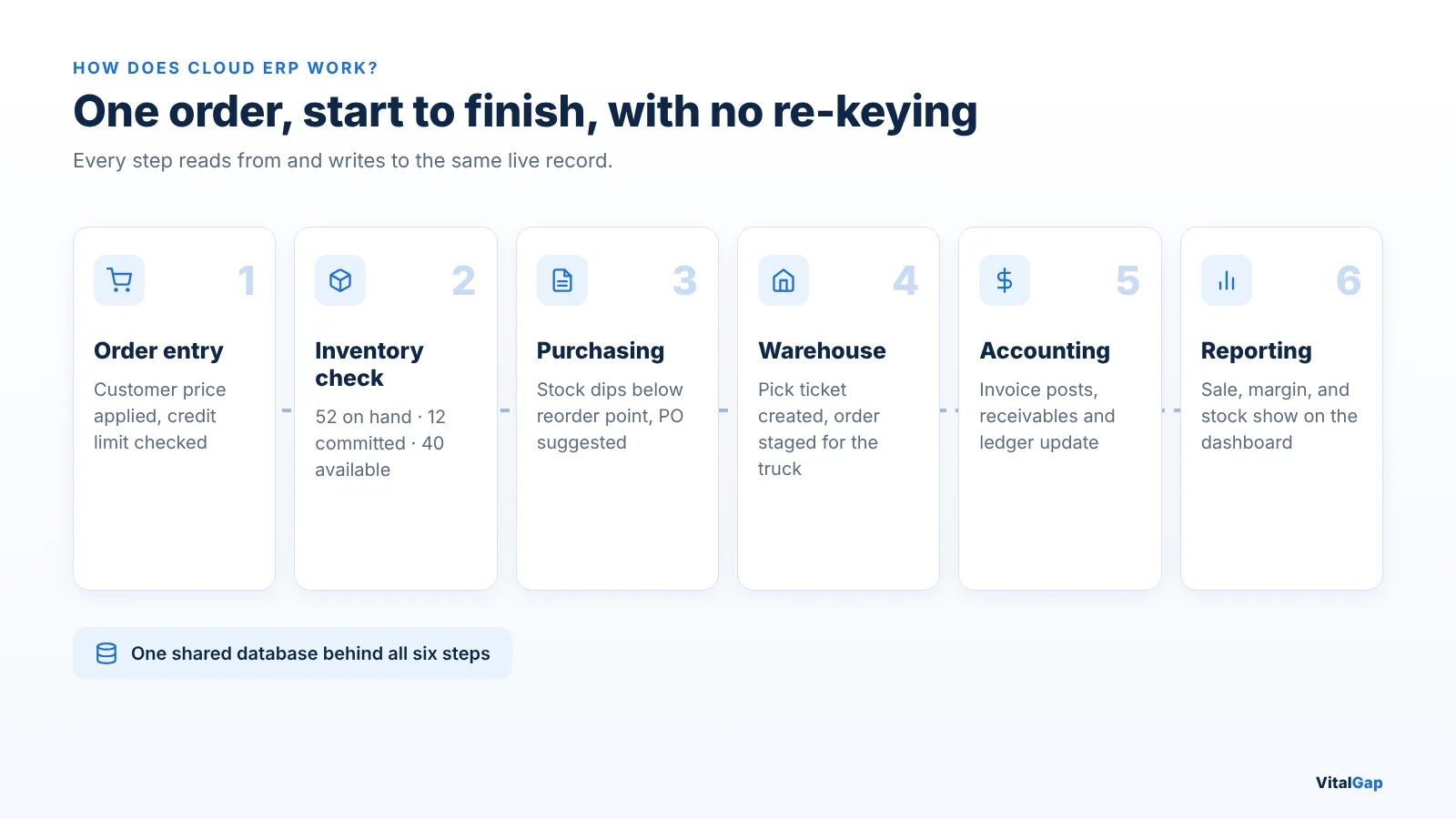
Cloud ERP works by keeping all of your business data in one central database hosted in the cloud. Every department reads from and writes to that same record, so a change in one area shows up everywhere at once.

Here is what happens behind the scenes:

  • Centralized business data. Customers, items, prices, stock, orders, and invoices live in one database. You keep one item record, not five copies in five tools.
  • Cloud infrastructure and hosting. The software runs in the provider's data centers or on a major cloud platform. You don't buy, house, or maintain servers.
  • Access across locations. Staff at the counter, in the warehouse, at a second branch, or on a job site sign in to the same system.
  • Connected workflows. One sales order can reserve stock, trigger a purchase suggestion, create a pick ticket, and post an invoice without anyone retyping it.
  • Updates, maintenance, and data management. The provider typically releases updates, patches known security issues, and runs backups. Your team stays focused on customers.

That connection is where the value lives. Separate tools leave gaps, and each gap costs time and margin. Our breakdown of why a disconnected software stack hurts ROI shows how those costs add up.

Example: One Distributor Order, Start to Finish

Let's go back to Maria. A contractor orders 40 breakers for delivery tomorrow morning. In a cloud ERP system, the order moves like this:

  1. Order entry. The rep enters the order at the counter. The system applies the contractor's agreed price and checks the account's credit limit.
  2. Inventory check. The screen shows 52 on hand, 12 committed to another job, and 40 available. The rep confirms the full order with confidence.
  3. Purchasing. Available stock now falls below the reorder point. The system flags a suggested purchase order, and the buyer sends it to the supplier.
  4. Warehouse. A pick ticket reaches the warehouse. Staff pick, pack, and stage the order for the morning truck.
  5. Accounting. The invoice posts when the order ships. Accounts receivable and the general ledger update the same day.
  6. Reporting. The owner sees the sale, the margin, and the new stock level on a live dashboard.

Nobody re-keyed the order. Nobody called another department to ask about stock. That is the everyday difference a connected system makes.
Key Features of Cloud ERP Software

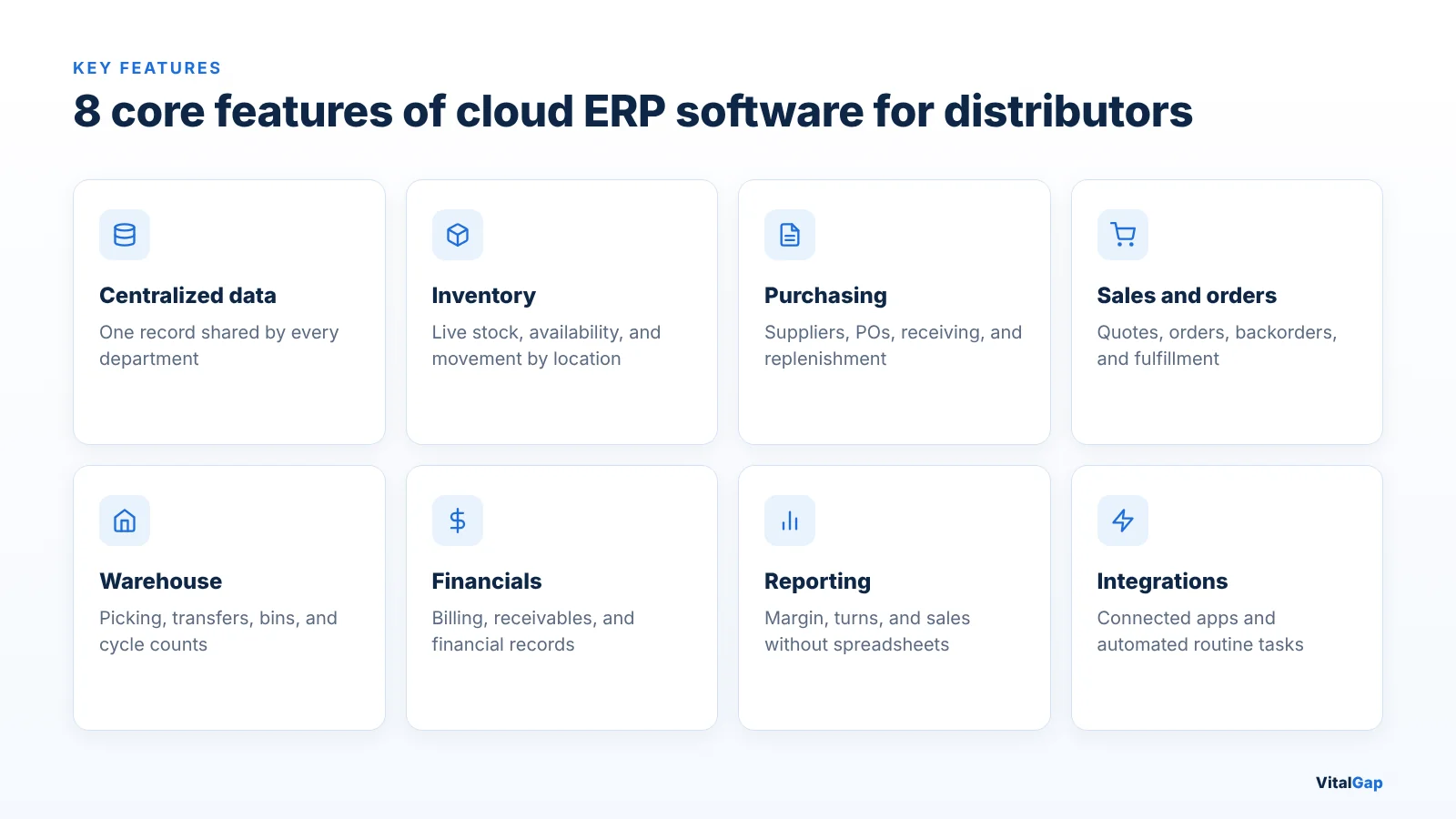
The best cloud ERP software for distributors covers eight core areas. Each one solves a daily operational problem, not just a reporting need.
  • Centralized data management. Keep customer, product, supplier, and transaction data connected across every department. One update reaches everyone.
  • Inventory management. Monitor stock levels, availability, and movements by location in real time. Good systems separate on-hand, committed, available, and on-order quantities. See what this looks like in inventory and warehouse management software.
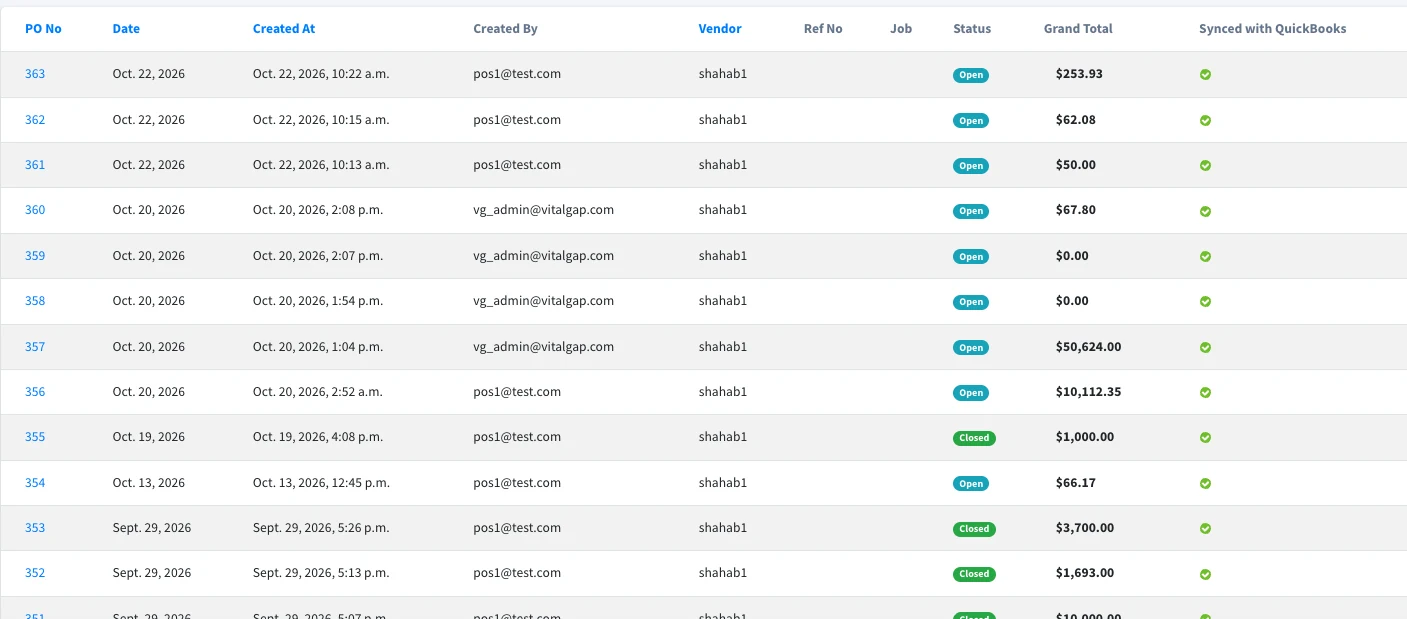
  • Purchasing management. Manage suppliers, purchase orders, receiving, and replenishment from the same data your sales team uses. Buyers can see demand before they spend. Learn more about purchase and vendor management.
  • Sales and order management. Coordinate quotes, orders, backorders, and fulfillment in one flow. Explore how order management software keeps orders moving.
  • Warehouse management. Improve visibility into picking, packing, transfers, bin locations, and cycle counts.
  • Financial management. Connect billing, expenses, receivables, and financial records to the operational transactions behind them. Strong credit control and invoicing protects cash flow.
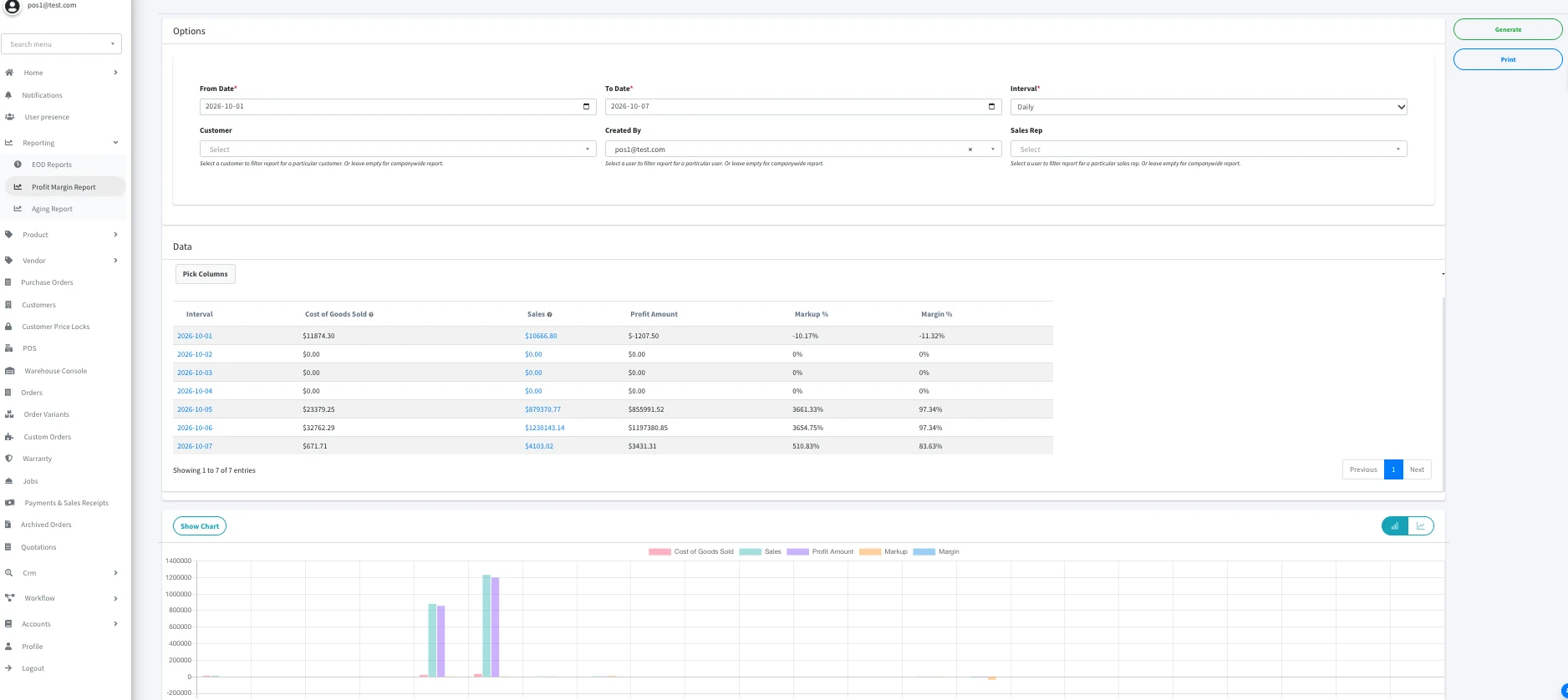
  • Reporting and analytics. Access margin, inventory turns, sales performance, and aging reports without exporting to spreadsheets. Modern tools add reporting and AI insights on top of live data.
  • Integrations and automation. Connect accounting, ecommerce, shipping, and supplier systems, and automate repetitive tasks. Read why API-first ERP matters for distributors when you plan integrations.

Benefits of Cloud ERP for Wholesale Distributors

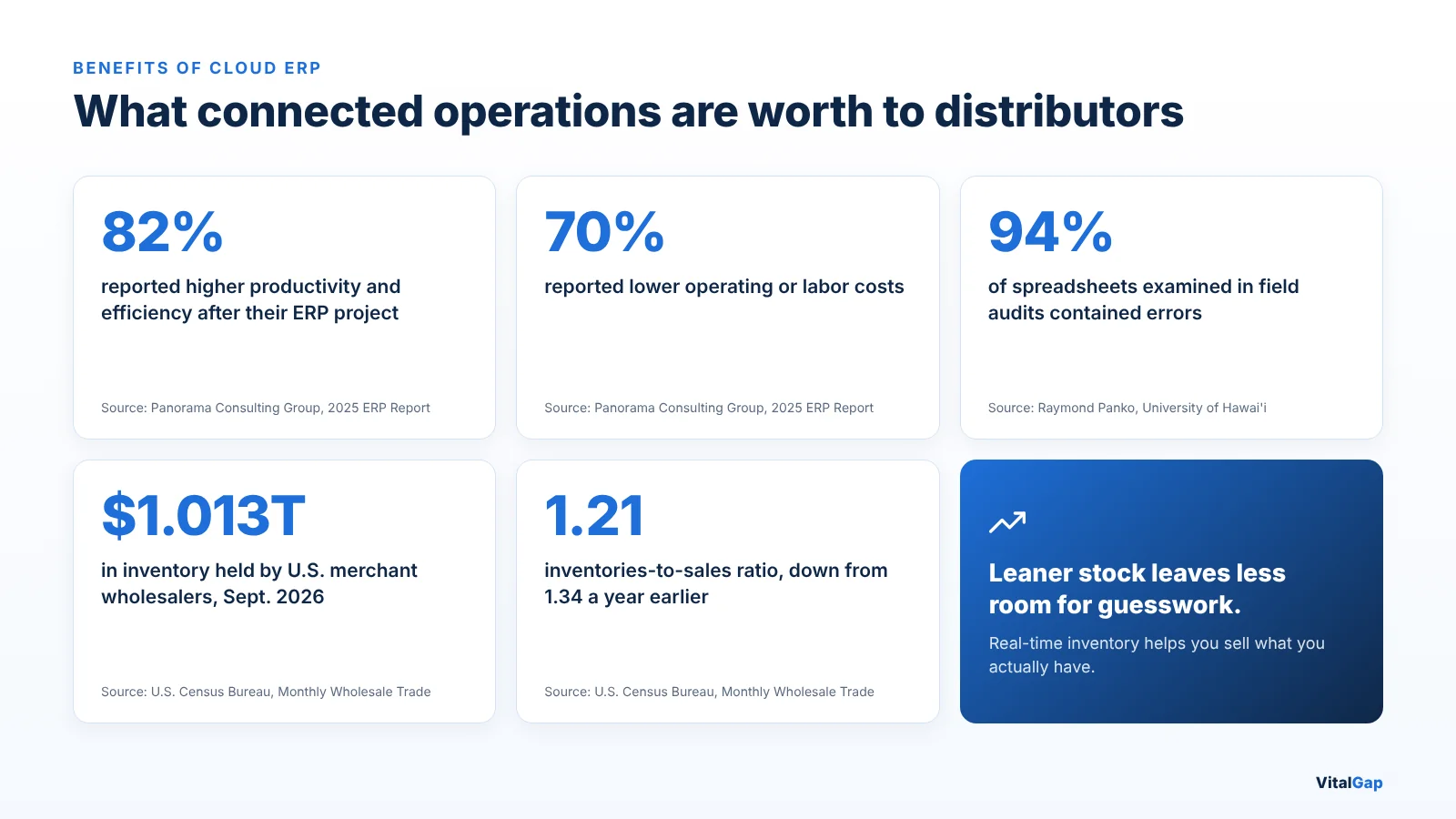
The biggest cloud ERP benefits show up in daily operations: fewer errors, faster orders, and smarter buying. Organizations feel it quickly. In Panorama Consulting Group's 2025 ERP Report, 82% of respondents reported higher productivity and efficiency, and 70% reported lower operating or labor costs.

Better visibility across warehouses and inventory

Inventory is a distributor's largest asset, and it is enormous. U.S. merchant wholesalers held $1.013 trillion in inventory at the end of September 2026, according to the U.S. Census Bureau's Monthly Wholesale Trade Report. A cloud ERP system shows that stock by branch and bin, in real time, so you sell what you actually have.
Improved purchasing and replenishment decisions

Buyers see on-hand, committed, and on-order quantities before they place a PO. That matters more as stock runs leaner. The same Census report puts the industry's inventories-to-sales ratio at 1.21, down from 1.34 a year earlier. Thinner buffers leave less room for guesswork.

Faster sales order processing

Reps quote, check stock, confirm pricing, and release orders from one screen. Customers get answers on the first call instead of a callback.

Reduced manual data entry and disconnected workflows

Retyping data between systems invites mistakes. Research by Raymond Panko at the University of Hawai'i found errors in 94% of real-world spreadsheets reviewed in field audits. Our look at manual processes in wholesale distribution shows what that costs a typical distributor.

Better coordination between departments

Sales, warehouse, purchasing, and accounting share one record. Handoffs happen inside the system, not over email or phone calls.
More accessible business reporting

Managers open live dashboards instead of waiting for month-end spreadsheets. Decisions happen while there is still time to act on them.

Greater flexibility as distribution operations grow

Adding a branch, a warehouse, or new users rarely means buying new hardware. Plan for growth by focusing on the ERP features that actually matter to your business.

Cloud ERP vs. On-Premise ERP: What's the Difference?

The main difference is where the software runs and who maintains it. Cloud ERP runs on the provider's infrastructure and is reached over the internet. On-premise ERP runs on servers your company owns and manages.

Comparison Cloud ERP On-Premise ERP
Hosting Cloud infrastructure Local company infrastructure
Accessibility Internet-based access Typically local network or configured remote access
Maintenance Often provider-managed Managed by the business or a service provider
Updates Often managed automatically Usually requires planned upgrades
Infrastructure Less local infrastructure required Requires local servers and hardware
Pricing Often subscription-based May involve upfront licensing and infrastructure costs
Scalability Depends on the provider and service plan May require additional infrastructure

Buyers are leaning toward the subscription model. In the same Panorama report, 72% of organizations chose software as a service (SaaS) over hosted or managed options.

Still, the right choice depends on your situation. Weigh your business requirements, security responsibilities, total costs, and in-house IT resources. A distributor with strict data-residency rules or a strong internal IT team may still prefer on-premise. A growing distributor with a small IT staff usually benefits from handing infrastructure to a cloud provider.
Is Cloud ERP Secure?

Yes, cloud ERP can be very secure, but it is not automatically safer than on-premise ERP. Security depends on the provider's architecture, its controls, and how your business configures and uses the system.

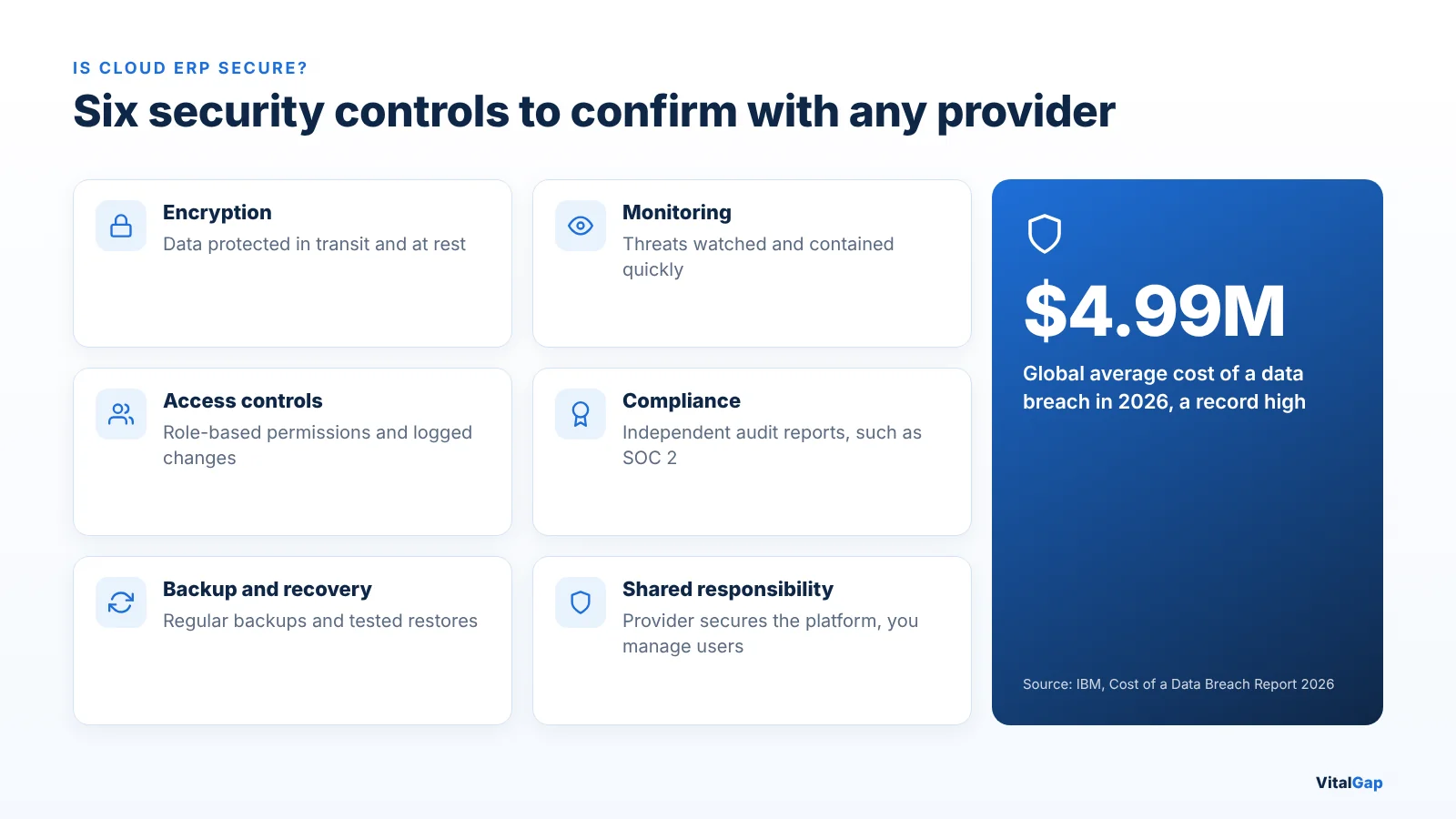
The stakes are real. IBM's Cost of a Data Breach Report 2026 puts the global average cost of a breach at a record $4.99 million, up 12% from the year before.

Ask every provider how it handles these six areas:

  • Data encryption and protection. Confirm data is encrypted in transit and at rest. Ask who manages the encryption keys.
  • User permissions and access controls. Look for role-based access, so a counter rep can't see what finance sees. Check whether price overrides and sensitive changes are logged.
  • Data backup and recovery. Ask how often backups run, where copies are stored, and how long a full restore takes.
  • Security monitoring. Find out who watches for threats and how fast incidents are contained. Speed matters: breaches that took more than 200 days to contain cost an average of $5.65 million, versus $4.32 million for faster ones, according to Baker Donelson's summary of the IBM findings.
  • Compliance requirements. Request independent audit reports, such as SOC 2, and confirm the provider supports any industry or regional rules you follow.
  • Provider security responsibilities. Get the shared responsibility model in writing. The provider secures the platform, while your team still manages passwords, user access, and approved devices.

Good security also depends on the people using the system. Our article on the technology behind VitalGap explains why access controls need regular review as roles change.

What to Consider When Choosing Cloud ERP Software

Choose cloud ERP software by how well it fits your daily distribution workflows, not by the length of its feature list. Use this checklist in every vendor demo.

What to evaluate What to confirm
Industry-specific functionality The system handles your trade's realities, such as contractor pricing, job quotes, cut lengths, or units of measure.
Inventory and warehouse capabilities Real-time stock by location, transfers, bin tracking, and cycle counts work out of the box.
Purchasing and order management Backorders, partial receipts, drop shipments, and replenishment suggestions are standard.
Integration with existing applications The system connects to your accounting, ecommerce, and shipping tools, including QuickBooks if finance stays there.
Reporting and analytics Managers can build the reports they use every week without exporting to spreadsheets.
Data security and access controls Role-based permissions, audit logs, encryption, backups, and independent audit reports are documented.
Implementation and migration support The vendor maps your items, customers, and history, and explains what will not transfer.
Pricing and total cost of ownership The quote covers subscription, implementation, migration, training, integrations, and support.
Scalability and customer support Adding users, branches, and warehouses is simple, and support response times are in writing.

For a deeper framework, our guide on what to look for in new-age distribution management software walks through each criterion. To see how leading platforms compare, review the top wholesale distribution ERP systems for 2026.
How VitalGap Helps Distributors Connect Their Operations

Wholesale distributors need more than software that stores business information. They need connected workflows that help inventory, purchasing, sales, billing, and reporting work together.

VitalGap brings these core distribution operations into one AI-driven platform. It is built for electrical, HVAC, steel and metal, and building materials distributors who want better visibility, fewer disconnected processes, and sharper operational decisions.

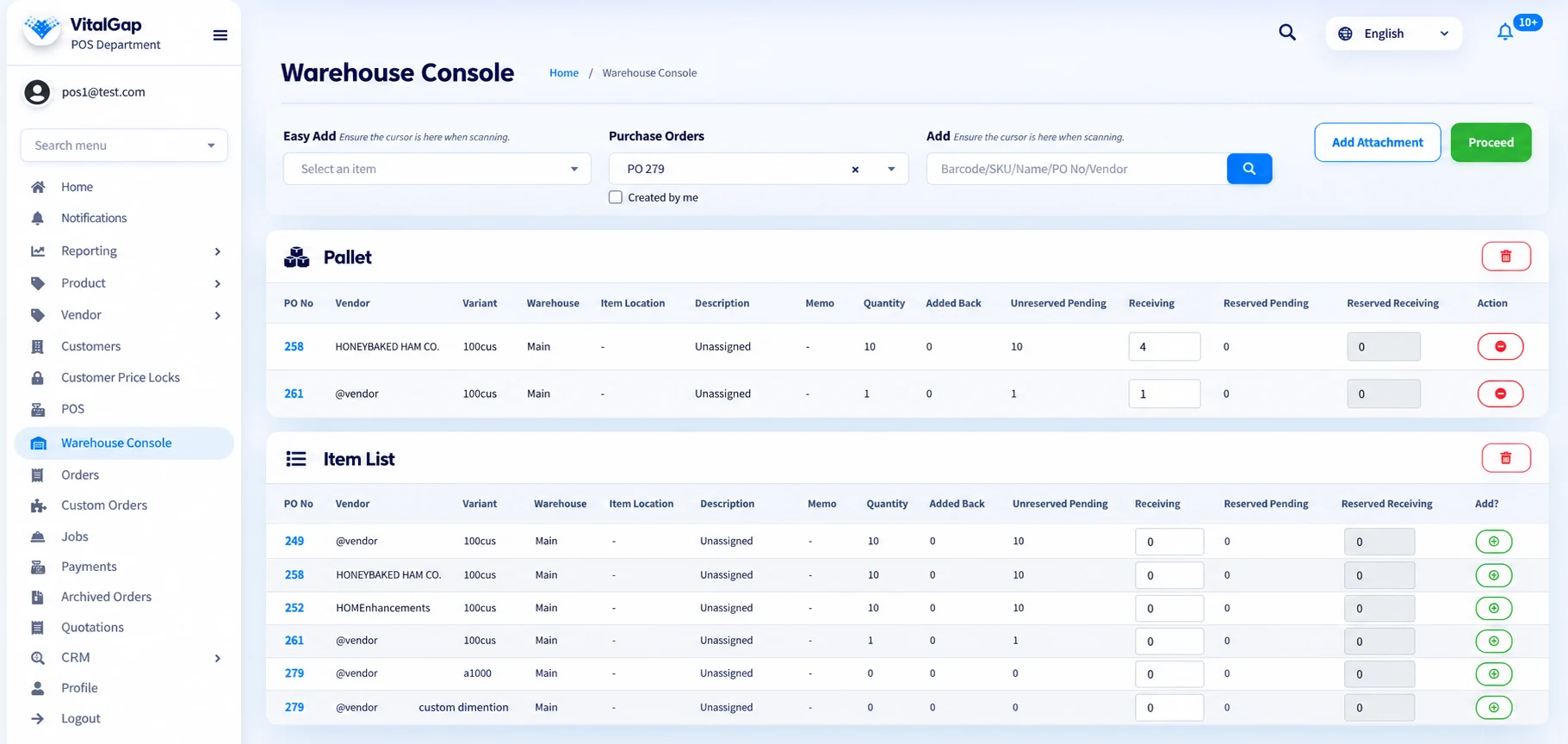
  • Unified distribution operations. VitalGap's unified operating system connects orders, inventory, purchasing, pricing, billing, and reporting. Sales, warehouse, purchasing, and leadership teams all work from the same real-time data.
  • Inventory visibility. Teams see real-time stock by warehouse and branch, with committed, available, and on-order quantities on every item. Transfers between locations update each site's numbers as they happen.
  • Connected workflows. Purchase orders stay tied to stock and customer demand. When goods arrive, receiving updates inventory and releases backorders. Staff can work in a web browser on a desktop, tablet, or phone, including at the counter with POS for wholesale distributors.
  • AI-driven intelligence. VitalGap's AI analyzes inventory movement, pricing behavior, and order flow. It flags inconsistencies early and recommends what to stock, including dynamic minimum and maximum levels.
  • Operational efficiency. Real-time sync with QuickBooks Online removes double entry, so finance keeps the books it trusts while operations run in a system built for distribution.

Explore how VitalGap helps wholesale distributors manage their operations in one unified system. Talk to the VitalGap team to see it with your own products, customers, and workflows.

Final Words

Think back to Maria's Monday. With cloud ERP, it ends differently. She sees the true count of 30 breakers before she makes a promise. Purchasing reorders the same morning, and accounting sees the sale the moment it ships.

That is the real promise of cloud ERP. It is not just new software in a new place. It is one shared version of the truth for every person who touches an order.

Start with your daily workflows. Pick a provider that understands distribution, proves its security, and supports your migration. Choose software built for distribution reality, and your team will spend less time chasing data and more time serving customers.

FAQ

Frequently Asked Questions

What are the main benefits of cloud ERP?

IconIcon

What is the difference between cloud ERP and on-premise ERP?

IconIcon

Is cloud ERP secure?

IconIcon

How long does cloud ERP implementation take?

IconIcon

Can cloud ERP integrate with other business applications?

IconIcon

Is cloud ERP suitable for small and medium-sized businesses?

IconIcon
Blog

Discover our latest posts

Ready to take your business to the next level?

Whether you're looking to streamline operations, boost efficiency, or drive growth, VitalGap has the solutions you need.

Schedule a Demo